• Welcome to Camera Craniums: The Photography Community for Enthusiasts.
 

Recent Posts

Members
Stats
  • Total Posts: 62,507
  • Total Topics: 5,734
  • Online today: 2,610
  • Online ever: 3,332 (December 26, 2025, 05:27:02 PM)
Users Online
  • Users: 0
  • Guests: 2485
  • Total: 2485
  • Google (AdSense)
  • Google
  • Baidu (2)
millets
Canon kit to borrow (free...Dreaminess Happy Christmas 2025!NiceVeedi 2-Pack Photogra...DJI Osmo Action 6 Essenti...RØDE Wireless ME Ultra-co...NEEWER Snap On ND Filter ...What made you feel good t...BRDRC Pocket 3 Camera Bik...Lenovo LOQ | 15.6 inch Fu...DJI Mic 3 (2 TX + 1 RX + ...DJI Mic Mini (2 TX + 1 RX...DJI OSMO Action 5 Pro 4 3...DJI Osmo Action 5 Pro Adv...Post your best shots hereAilun Tripod Phone Mount ...

Poll for Cats and Dogs

Started by jinky, March 10, 2015, 06:28:16 AM

Previous topic - Next topic

Vote for your favourite meeting the brief

Musher Dog


1 (5.9%)
Dying Cockroach


0 (0%)
Timmy Wolf


3 (17.6%)
Scarface


1 (5.9%)
Molly


0 (0%)
Surf`s Up


0 (0%)
Faithful Companion


0 (0%)
Mooncat


8 (47.1%)
Daisy


3 (17.6%)
Double Act


1 (5.9%)

Total Members Voted: 17

Voting closed: March 14, 2015, 06:28:16 AM

Beaux Reflets

#15
Paul, I can see what you mean about a crop. Because of the high angle of the shot and instant eye contact, I felt that keeping the paw tight to the corner added a sense of "Come on give me the command! Come on I want to Ggo!!" - an interaction ?  :-\  which obviously failed somehow  :(  ;)
:beer: Andy

"Light anchors things in place and gives perspective meaning."

The choices we make are rooted in reflection.

http://beauxreflets.blogspot.com/

Oldboy


oggalily

Thanks for the feedback Andy.

DigiDiva

Its great to see comments and feedback here . I personally would like this every week but not everyone feels the same. From the up/down days from DCM from those who were there then, I personally learned so much from it.
Please visit my website @ www.sunderlandwallart.com

spikeyjen

hi All and congratulations Jinky.
It is nice to see some feedback and I also hope that this continues in the spirit of sharing and helping others. Even if we indicate why we chose a particular image.

So here is my attempt at some feedback, and remember, it's just my opinion.

My vote went for Scarface - and it wasn't a sympathy vote. I actually chose it for it's 'technical correctness'. Love the blurred DOF and the cat is sharp (esp the eyes). It's hard to go white and dark in one photo and this has also been done well. I also like that the cat is a little off centre (just a think I like).
Daisy nearly won it for me, this is just picture postcard, beautiful eyes and colors and a great neutral background.
Dying cockroach made me laugh, this is a great subject but the image needs a little work to improve the color, and give the dog's eyes a sparkle (this is where people will look first).
Both Molly and Faithful companion are great subjects that are well positioned in the frame with some room for the subject to 'look or move into'. Both of them have backgrounds that are a little distracting, either with similar colors (Molly) or objects (Faithful...). Try to find a neutral background and use a wide aperture (small f-stop) to blur the background. Faithful would have looked great against that wooden wall.
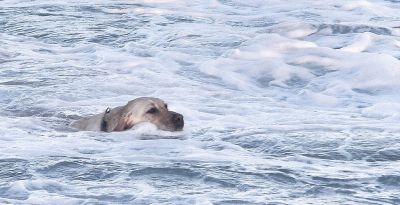
Surf's Up, is a great concept but would have had more impact if you used a longer lens or was closer. Perhaps try cropping and check your levels to reduce the brightness.
I also liked Double Act, great concept, just a shame dog #2 is looking the wrong way. Try a whistle, noise (bark) or a suggestion of a treat to get them both to look at you at the same time. The red dog lead is a distraction but the matching collars is nice.
Moon Cat is also great, and nice to see something 'outside the box'.

Hope noone is offended by the comments. If anyone wants some further explanation, please just ask


jinky

Quote from: oggalily on March 14, 2015, 04:13:47 PM
Good selection of images this week.  Glad I talked you back into your origin image Jinky, I knew it was a winner. 

As for my own "faithful companion", I am a little disappointed not to get any votes for an unorthodox take on the subject but I suspect based n Jinky's comments that I didn't get my message across clearly enough.  The idea was supposed to be that he had been abandoned in the attic, however the attic clutter maybe didn't work as intended and just looked like a messy background.  I'd appreciate any comments/feedback on what I might have done differently.  Or maybe people didn't think it fit the brief due to not having a real animal in it?

I've already got an image in the can for "weather", just need to tweak it in Lightroom.

Ah - I get it more now ogga. Just shows you can never know what is in the person`s mind when taking the shot. I agree with Andy though that the white distracting background item does detract from an otherwise sharp, well lit subject.

Ken.

Congratulations jinky!  :tup:

Quote from: spikeyjen on March 14, 2015, 10:59:01 PM
Dying cockroach made me laugh, this is a great subject but the image needs a little work to improve the color, and give the dog's eyes a sparkle (this is where people will look first).

Thanks for the feedback spikeyjen.  8)
When posting the picture I knew that it was not really at the same technical level as other submissions would be, but posted it anyway just for fun.

Hinfrance

Thank you Jen for voting for Milo (Scarface). I quickly processed the shot in DxO 9. I sometime find LR is not up to the job - but that's probably me not being able to get the best out of it.

Andy/Paul - I see what you mean about the crop Paul, but I am with Andy on this, liked the fact that the paw was in shot.

Ogga, I was kind of with you on the idea, but didn't quite get it, I admit. For me there is just too much space around the faithful companion, although I like the angle.
Howard  My CC Gallery
My Flickr
The theory seems to be that as long as a man is a failure he is one of God's children, but that as soon as he succeeds he is taken over by the Devil. H.L Mencken.

ABERS

Interesting to read people's comments on other's pictures. It shows perhaps how their own approach to photography is based, and especially if the pictures are not widely different in subject, composition or creativity.

I didn't vote so the result is of no consequence, but the image that I think could have been made more of is the white cat 'Daisy'. It has the beginnings of an interesting high key image, but with some work could be more engaging as a black + white high key picture. The large liquid blue eyes  lend themselves to being the major highlight of the image.

Just a thought.

DigiDiva

Abers thanks for the comments. I did do a b&w conversion to use for my greeting cards and it does look fab so I can agree with what you said. I used the colour version for the comp as I thought if was more fitting.

Can you give me some photo shopping tips for the high key effect? I have only ever done high key with actual lighting never with photoshop.
Please visit my website @ www.sunderlandwallart.com

Oldboy

Quote from: spikeyjen on March 14, 2015, 10:59:01 PM
Both Molly and Faithful companion are great subjects that are well positioned in the frame with some room for the subject to 'look or move into'. Both of them have backgrounds that are a little distracting, either with similar colors (Molly) or objects (Faithful...). Try to find a neutral background and use a wide aperture (small f-stop) to blur the background. Faithful would have looked great against that wooden wall.


Thanks for the feed back. The reason I posted this shot is Molly's stance facing into the wind. As with wildlife shots you can't pick the background so have to go with it as is. It was shot at 1,000s at F8 as that is the setting I use for wildlife shots unless I have time to alter it. In this case I didn't, as there was lots of other dogs around so, was my only chance to get this shot where she isn't looking at me or interacting with other dogs or people.  ;D

Quote from: spikeyjen on March 14, 2015, 10:59:01 PM

Hope noone is offended by the comments.


Lets just say that I've crossed you off my Christmas card list!!!!  :yikes:  :P

ABERS

Quote from: DigiDiva on March 15, 2015, 11:36:41 AM

Can you give me some photo shopping tips for the high key effect? I have only ever done high key with actual lighting never with photoshop.

As you doubtless know  from your lighting knowledge a high key effect should have no shadows within the image, thus any portrait will have a direct flat lighting on the subject, with the background completely bleached out.

The way I would approach your cat picture in photoshop CS5 is as follows, bearing in mind I'm doing this in my minds eye as I go along!

Firstly change image to mono, then up the contrast. Secondly using the select tool select each eye. Then using the select drop down menu, select inverse, thus any action will not affect the eyes.

Using the brightness/contrast from the layers menu use the sliders to arrive at an almost line drawing of the cat.

Go back to the select drop down menu and click on reselect, then click on to inverse. This should allow you to then work on the eyes in isolation again using the brightness/contrast until you feel the eyes have the right intensity.

Flatten the image when you feel you've arrived at your destination.

I would work on the image in L/room to get to the mono image initially using the colour sliders to arrive at the line drawing effect, then transfer to photoshop CS5 before working on the eyes.

Hope that makes sense! :)


This website is proudly hosted on Crocweb Cloud Website Hosting.


Camera Craniums is a participant in the Amazon EU Associates Program. This affiliate advertising program designed to provide a means for sites to earn advertising fees by advertising and linking to products on Amazon.